


As a supplier of Volkswagen flip logo rearview cameras, I often receive inquiries from customers about how to maintain and clean these cameras. A clean camera housing is crucial for optimal performance and a clear view while reversing. In this blog post, I'll share some detailed steps on how to clean the inside of the Volkswagen flip logo rearview camera housing.
Why Cleaning the Inside of the Camera Housing Matters
The Volkswagen flip logo rearview camera is a sophisticated piece of equipment. Over time, dust, dirt, moisture, and other contaminants can accumulate inside the camera housing. This can lead to a blurry or obstructed view, which defeats the purpose of having a rearview camera. A clean camera ensures that you have a clear and accurate view of what's behind your vehicle, enhancing safety while reversing.
Tools You'll Need
Before you start cleaning the inside of the camera housing, gather the following tools:
- Compressed air can: This is used to blow out loose dust and debris.
- Microfiber cloth: Soft and lint - free, it won't scratch the camera lens or the housing.
- Isopropyl alcohol: A mild cleaning agent that can dissolve grease and dirt.
- Cotton swabs: Useful for reaching small and hard - to - reach areas.
- Small Phillips head screwdriver: If you need to open the camera housing.
Step 1: Prepare Your Vehicle
First, make sure your vehicle is parked in a safe and well - lit area. Turn off the engine and engage the parking brake. It's also a good idea to disconnect the negative terminal of the car battery to prevent any electrical issues while working on the camera.
Step 2: Remove the Camera
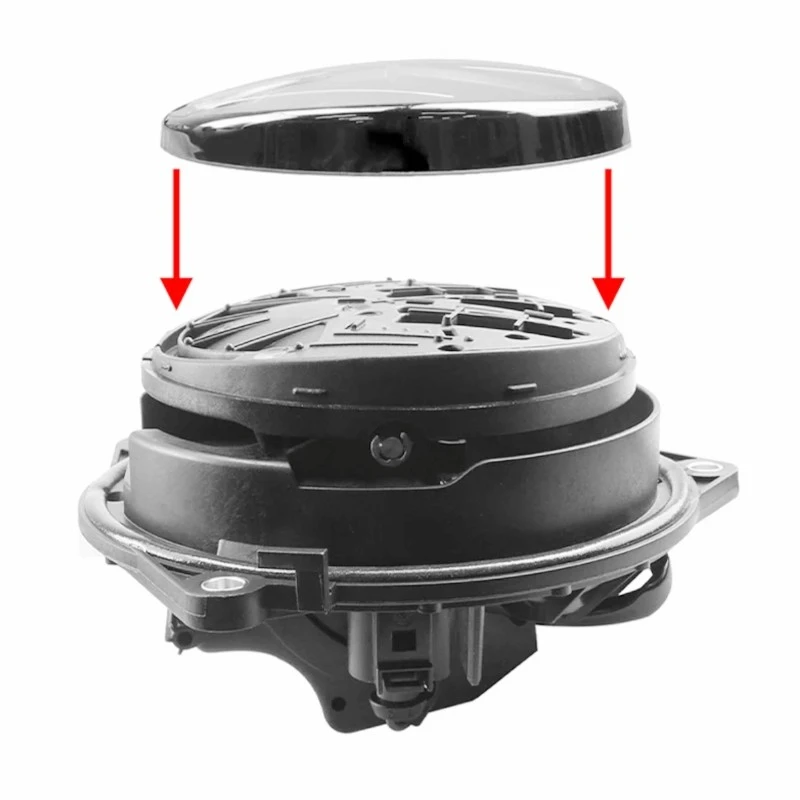
The process of removing the Volkswagen flip logo rearview camera varies depending on the model of your vehicle. In most cases, you'll need to access the trunk or rear hatch area. Locate the screws or clips that hold the camera in place. Use the small Phillips head screwdriver to remove the screws if necessary. Gently pull the camera out, being careful not to damage the wiring.
Step 3: Inspect the Camera Housing
Once you've removed the camera, take a close look at the housing. Check for any visible signs of damage, such as cracks or loose parts. If you notice any damage, it's best to replace the camera housing to ensure proper functionality.
Step 4: Blow Out Loose Debris
Take the compressed air can and hold it a few inches away from the camera housing. Use short, controlled bursts of air to blow out any loose dust and debris. Pay special attention to the lens area and the small openings in the housing. This step will remove a significant amount of the dirt without the need for direct contact.
Step 5: Clean the Lens
Dampen a corner of the microfiber cloth with a small amount of isopropyl alcohol. Gently wipe the camera lens in a circular motion. Start from the center of the lens and work your way outwards. Be careful not to apply too much pressure, as this could scratch the lens. If there are stubborn stains, you can use a cotton swab dipped in isopropyl alcohol to carefully clean the edges of the lens.
Step 6: Clean the Inside of the Housing
For the inside of the housing, use the cotton swabs dipped in isopropyl alcohol to clean the hard - to - reach areas. Pay attention to the corners and the areas around the wiring connections. Wipe away any dirt or grime that you find. Then, use the microfiber cloth to give the entire inside of the housing a final wipe to remove any remaining alcohol and debris.
Step 7: Reassemble the Camera
Once the camera housing and lens are clean and dry, it's time to reassemble the camera. Carefully place the camera back into its original position and secure it with the screws or clips. Make sure the wiring is properly connected and not pinched.
Step 8: Test the Camera
Reconnect the negative terminal of the car battery. Start the engine and put the vehicle in reverse. Check if the rearview camera is working properly and if the view is clear. If you still notice any issues, double - check the cleaning process or consult a professional.
Our Product Range
As a leading supplier of Volkswagen flip logo rearview cameras, we offer a wide range of high - quality products. Our Volkswagen OEM MQB Badge Flip Logo Rear View Camera is designed to fit perfectly with MQB platform vehicles. It provides a clear and wide - angle view, ensuring your safety while reversing.
Another great option is our Volkswagen OEM SSP Platform Flip Badge Rear Camera with Dynamic Trajectory. This camera is specifically tailored for SSP platform vehicles and features a dynamic trajectory system that helps you park more accurately.
For those who need a high - resolution camera, our Volkswagen 170 Degree 1080P Emblem - Flip Logo Backup Camera is an excellent choice. With a 170 - degree viewing angle and 1080P resolution, it offers a detailed and comprehensive view of the area behind your vehicle.
Contact Us for Purchase and Consultation
If you're interested in purchasing our Volkswagen flip logo rearview cameras or have any questions about camera maintenance and cleaning, we're here to help. Whether you're a car enthusiast looking to upgrade your vehicle or a professional installer, we can provide you with the right products and support. Don't hesitate to reach out to us for more information and to start a purchase negotiation.

References
- Volkswagen vehicle owner's manuals
- Automotive aftermarket industry publications on camera maintenance


