


Hey there! As a supplier of Lexus reversing camera decoding modules, I've seen my fair share of issues with these nifty little gadgets. In this blog, I'm gonna walk you through how to troubleshoot a Lexus reversing camera decoding module. So, let's dive right in!
1. Check the Basics First
Before you start tearing your hair out trying to figure out what's wrong with the decoding module, it's always a good idea to check the basics. First off, make sure the power supply is working. A loose or faulty power connection can cause all sorts of problems. Check the wiring harness to see if there are any loose connections, frayed wires, or signs of damage. If you find any issues, you might need to repair or replace the wiring.
Also, take a look at the camera itself. Sometimes, the problem isn't with the decoding module at all but with the camera. Make sure the camera lens is clean and free of any dirt, debris, or moisture. A dirty lens can result in a blurry or distorted image. You can use a soft, lint - free cloth to clean the lens gently.
2. Inspect the Decoding Module for Physical Damage
Once you've checked the basics, it's time to take a closer look at the decoding module. Look for any signs of physical damage, such as cracks, burns, or water damage. If the module has been exposed to water, it might be fried, and you'll probably need to replace it.
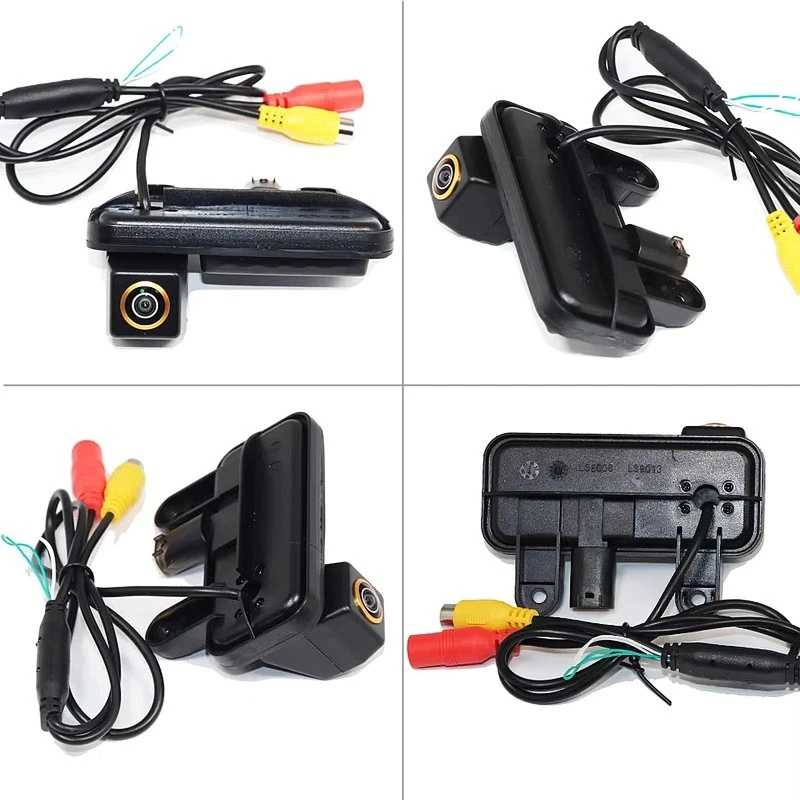

If you notice any visible damage, it's a clear indicator that the module is likely the root of the problem. However, even if there are no obvious signs of damage, the module could still be malfunctioning.
3. Test the Video Signal
One of the most common issues with a reversing camera decoding module is a poor or no video signal. To test the video signal, you can use a multimeter. First, set the multimeter to the appropriate voltage setting. Then, connect the probes to the video output pins of the decoding module.
If you don't get a proper voltage reading, it means there's a problem with the video signal. This could be due to a faulty module, a bad connection, or an issue with the camera. You might need to check the connections between the camera, the decoding module, and the display unit to make sure everything is properly connected.
4. Update the Firmware
Just like your smartphone or computer, the decoding module might need a firmware update. Sometimes, manufacturers release firmware updates to fix bugs, improve performance, or add new features. Check the manufacturer's website to see if there are any available firmware updates for your specific Lexus reversing camera decoding module.
Updating the firmware is usually a straightforward process. You'll need to download the update file to a USB drive and then insert the USB drive into the appropriate port on the decoding module. Follow the on - screen instructions to complete the update.
5. Check Compatibility
Another thing to consider is compatibility. Make sure the decoding module you're using is compatible with your Lexus model and the camera you've installed. Using an incompatible module can lead to all sorts of problems, including a blank screen, distorted images, or no signal at all.
If you're not sure about the compatibility, you can refer to the product documentation or contact the manufacturer for assistance. They can help you determine if the module is the right fit for your vehicle.
6. Seek Professional Help
If you've tried all the above steps and still can't figure out what's wrong with the decoding module, it might be time to seek professional help. A qualified automotive technician or an electronics expert can use specialized tools and diagnostic equipment to pinpoint the problem accurately.
They can also provide you with more in - depth advice on whether the module can be repaired or if it needs to be replaced.
Related Products
If you're in the market for other types of rear - view cameras, we've got some great options. Check out our Multi - Brand High - Mount Brake Light Camera for Renault/Opel/Nissan. It's a versatile camera that can be used with multiple brands, offering a great view when reversing.
We also have the Universal For 2010 - 2016 Mercedes - Benz E - Class (W212) Reverse Camera. This camera is specifically designed for the Mercedes - Benz E - Class, ensuring a perfect fit and high - quality performance.
And for Chevrolet/GMC commercial vehicle owners, our Chevrolet/GMC Commercial Vehicle High - Mount Brake Light Camera is a great choice. It provides a clear view of what's behind your vehicle, enhancing safety on the road.
Conclusion
Troubleshooting a Lexus reversing camera decoding module might seem daunting at first, but by following these steps, you can often identify and fix the problem. Remember to start with the basics, check for physical damage, test the video signal, update the firmware, and ensure compatibility.
If you're still having issues, don't hesitate to reach out. As a supplier of these modules, we're here to help you with any questions or concerns you might have. Whether you need a replacement module, advice on installation, or troubleshooting tips, we're just a message away. Contact us to start a discussion about your needs and find the best solution for your Lexus reversing camera system.
References
- General automotive repair manuals
- Lexus vehicle owner's manuals
- Decoding module product documentation


