


Integrating a BMW reversing camera decoding module with a factory - installed navigation system can significantly enhance the driving experience, providing better visibility and safety when reversing. As a leading supplier of BMW reversing camera decoding modules, I'm here to share a comprehensive guide on how to achieve this integration.
Understanding the Basics
Before diving into the integration process, it's crucial to understand the key components involved. A BMW reversing camera decoding module is designed to translate the signals from the reversing camera into a format that the factory - installed navigation system can understand. This allows the camera's image to be displayed on the navigation screen, providing a clear view of what's behind the vehicle.
There are different types of decoding modules available for various BMW systems. For example, the BMW NBT System Backup Decoder Module is specifically tailored for the NBT system. It offers seamless integration and ensures that the camera feed is accurately displayed on the NBT - equipped navigation screen.
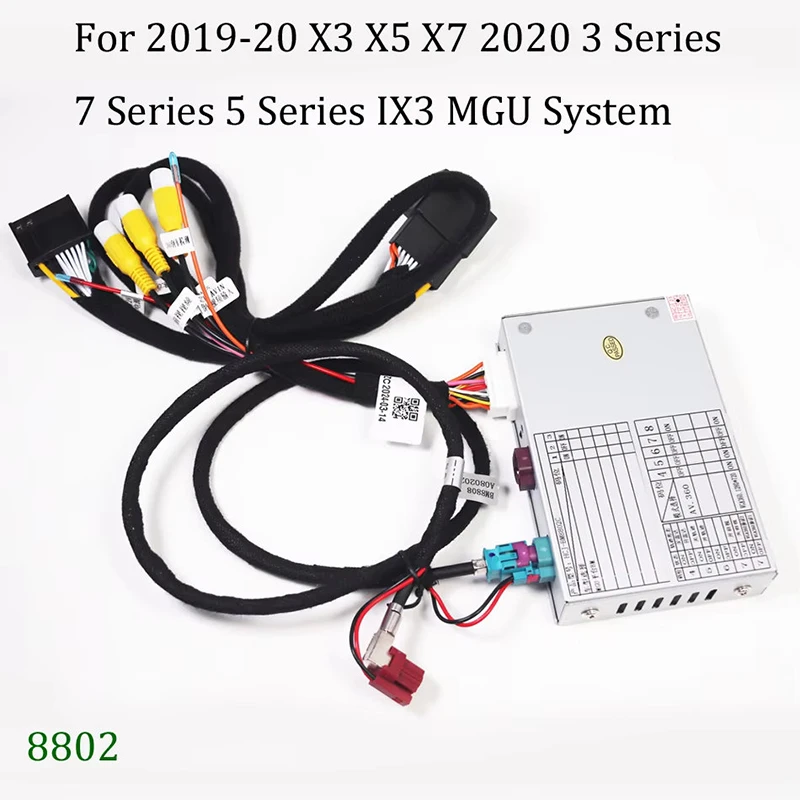
The BMW MGU System Reverse Camera Decoder Module (Full 2019 - 2024 Model Compatibility) is suitable for BMW models with the MGU system from 2019 to 2024. It provides full compatibility with these newer models, guaranteeing a smooth and reliable connection between the camera and the navigation system.
Similarly, the BMW EVO System Reverse Camera Decoder Module (Full 2017 - 2019 Model Compatibility) is engineered for BMW vehicles with the EVO system from 2017 to 2019. This module is designed to work in harmony with the specific requirements of the EVO system, ensuring optimal performance.

Pre - integration Preparation
- Vehicle Inspection:
- First, thoroughly inspect your BMW to determine the exact model and the type of factory - installed navigation system it has. This information is essential as it will help you select the appropriate decoding module. For example, if you have a 2020 BMW with an MGU system, you'll need the BMW MGU System Reverse Camera Decoder Module.
- Check the condition of the existing wiring harnesses and connectors in the vehicle. Look for any signs of damage, such as frayed wires or loose connections. If any issues are found, they should be repaired before proceeding with the integration.
- Module Selection:
- Based on your vehicle's navigation system, choose the correct decoding module. Make sure to purchase from a reliable supplier, like us, to ensure the quality and compatibility of the module.
- Read the product specifications carefully to understand the features and requirements of the selected module. Some modules may require additional accessories or software updates for full functionality.
- Gather Tools:
- You'll need a set of basic tools for the integration process. These may include a screwdriver set (both Phillips and flat - head), wire strippers, electrical tape, and a multimeter. The multimeter can be used to test the electrical connections and ensure that there are no short circuits.
Integration Steps
- Disconnect the Battery:
- As a safety precaution, disconnect the negative terminal of the vehicle's battery. This will prevent any electrical shocks or short circuits during the installation process.
- Locate the Navigation System:
- In most BMWs, the factory - installed navigation system is located in the center console. Remove the necessary panels and trim pieces to access the navigation unit. This may require using a screwdriver to remove screws and gently prying off the panels.
- Identify the Wiring Harnesses:
- Once the navigation system is exposed, identify the wiring harnesses associated with it. There will typically be a main power harness, a data harness, and potentially a camera harness. Refer to the vehicle's service manual or the decoding module's installation guide for specific information on the wiring harnesses.
- Connect the Decoding Module:
- Take the selected decoding module and connect it to the appropriate wiring harnesses. Most decoding modules come with detailed instructions on how to make these connections. Usually, you'll need to connect the power supply wires, the data transfer wires, and the camera input wires.
- Use wire strippers to carefully strip the insulation from the wires and connect them using appropriate connectors or by soldering. Make sure to secure the connections with electrical tape to prevent any loose connections.
- Install the Reversing Camera:
- If your vehicle doesn't already have a reversing camera, you'll need to install one. Choose a high - quality camera that is compatible with the decoding module. Mount the camera in a suitable location at the rear of the vehicle, such as near the license plate.
- Connect the camera to the decoding module using the provided cables. Ensure that the camera is properly aligned and that there are no obstructions blocking its view.
- Reconnect the Battery:
- After all the connections are made, reconnect the negative terminal of the vehicle's battery. This will restore power to the vehicle's electrical system.
- Test the System:
- Start the vehicle and put it in reverse gear. Check if the reversing camera image is displayed on the factory - installed navigation screen. If the image is not showing, double - check all the connections and make sure that the module is properly configured. You may need to refer to the module's troubleshooting guide or contact technical support for assistance.
Troubleshooting
- No Image on the Screen:
- If there is no image on the navigation screen when the vehicle is in reverse, first check the power connections to the decoding module and the camera. Make sure that the power supply is stable and that there are no loose wires.
- Check the camera itself to ensure that it is functioning properly. You can try connecting the camera to a different power source or testing it with a different device to verify its functionality.
- Poor Image Quality:
- If the image quality is poor, such as being blurry or having a lot of noise, check the camera's lens for dirt or debris. Clean the lens with a soft, dry cloth.
- Also, check the cable connections between the camera and the decoding module. A loose or damaged cable can cause signal interference and result in poor image quality.
- System Errors:
- If the navigation system displays error messages related to the camera or the decoding module, refer to the module's user manual or contact the manufacturer's technical support. They can provide specific instructions on how to resolve the error.
Post - integration Considerations
- Software Updates:
- Some decoding modules may require software updates to ensure optimal performance. Check the manufacturer's website regularly for any available updates and follow the instructions to install them.
- Regular Maintenance:
- Periodically check the connections and the camera to ensure that they are still in good condition. Over time, vibrations and temperature changes can cause connections to loosen or components to degrade.
- Legal Compliance:
- Make sure that the installation of the reversing camera and decoding module complies with local laws and regulations. Some areas may have specific requirements regarding the use of aftermarket automotive accessories.
Conclusion
Integrating a BMW reversing camera decoding module with a factory - installed navigation system is a rewarding process that can enhance the safety and convenience of your driving. By following the steps outlined above and using high - quality components, you can achieve a seamless integration.
If you're interested in purchasing a BMW reversing camera decoding module or have any questions about the integration process, we're here to help. Contact us for more information and to start a procurement discussion. We offer a wide range of decoding modules for different BMW systems, ensuring that you can find the perfect fit for your vehicle.
References
- BMW vehicle service manuals
- Decoding module installation guides provided by the manufacturer


