


Hey there! As a supplier of brake light series reversing cameras, I've seen my fair share of issues that customers run into. In this blog, I'm gonna walk you through how to troubleshoot problems with these nifty gadgets.
1. Check the Power Supply
The first thing you gotta do when your brake light series reversing camera acts up is to check the power supply. A lot of the time, the problem boils down to a simple power issue.
Start by making sure the camera is properly connected to the power source. The power cable should be securely plugged in at both ends - the camera and the power outlet. Sometimes, vibrations from driving can loosen these connections. If you find that the cable is loose, just plug it in firmly and see if the camera starts working.
If the connection seems fine, check the fuse. A blown fuse can cut off the power to the camera. Locate the fuse box in your vehicle and find the fuse related to the reversing camera. You can usually tell if a fuse is blown by looking at the metal strip inside. If it's broken, replace it with a new fuse of the same rating.
2. Inspect the Wiring
Wiring problems are another common culprit when it comes to camera malfunctions. Over time, the wires can get damaged due to wear and tear, or they might get pinched or cut during installation or vehicle maintenance.
Take a close look at the wiring between the camera and the monitor. Look for any signs of fraying, cuts, or exposed wires. If you find any damaged wires, you'll need to repair or replace them. You can use electrical tape to patch up small cuts, but for more serious damage, it's better to replace the entire wire.
Also, check the connectors. Make sure they are clean and free of corrosion. Corroded connectors can cause poor electrical conductivity, which can lead to problems with the camera's performance. You can use a wire brush or sandpaper to clean the connectors if they are dirty or corroded.
3. Examine the Camera Lens
A dirty or damaged camera lens can also cause issues with the image quality. If the image on the monitor is blurry, hazy, or has spots, the lens might be the problem.
Start by cleaning the lens. Use a soft, lint-free cloth to gently wipe the lens. You can also use a small amount of lens cleaner if the lens is really dirty. Avoid using abrasive materials or harsh chemicals, as they can scratch or damage the lens.
If cleaning the lens doesn't solve the problem, check for any physical damage to the lens. If the lens is cracked or broken, you'll need to replace the camera.
4. Check the Monitor
Sometimes, the problem isn't with the camera itself, but with the monitor. If the monitor is not displaying the image correctly, there could be an issue with its settings or its connection to the camera.
First, check the monitor's settings. Make sure the input source is set to the correct channel for the reversing camera. Some monitors have multiple input channels, so it's easy to accidentally select the wrong one.
Next, check the connection between the monitor and the camera. Make sure the video cable is securely plugged in at both ends. If the connection seems fine, try resetting the monitor. You can usually do this by turning it off and on again, or by pressing the reset button if there is one.
5. Compatibility Issues
If you've recently installed a new camera or monitor, compatibility issues could be causing the problems. Not all cameras and monitors are compatible with each other, so it's important to make sure you're using the right combination.
Check the specifications of your camera and monitor to make sure they are compatible. Look for information about the video output format, resolution, and power requirements. If you're not sure, you can contact the manufacturer or a professional installer for advice.

6. Specific Product Considerations
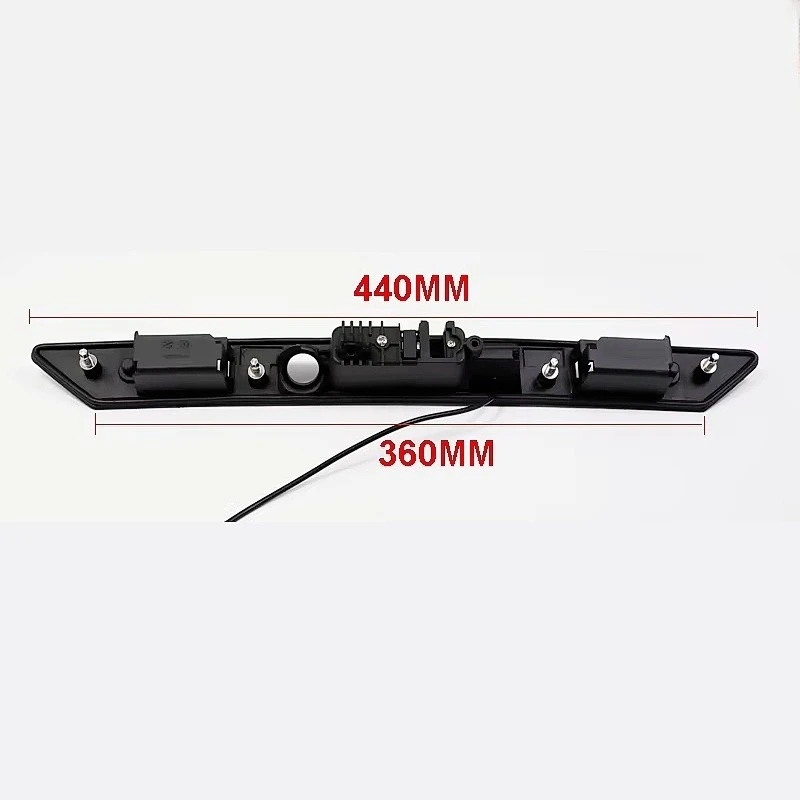
We offer a range of brake light series reversing cameras, and some of our products have unique features and potential issues. For example, the Audi A6 Extended Handle-Mounted Camera is designed specifically for Audi A6 vehicles. When troubleshooting this camera, make sure it is properly installed in the handle of the tailgate. Any misalignment during installation can affect the camera's performance.
The Land Rover Harman 8" Reverse Camera Decoder Module (Full 2016 - 2017 Model Compatibility) is a decoder module that is used to enhance the performance of the reversing camera in Land Rover vehicles. If you're having problems with this module, check the connections between the module and the camera and the monitor. Also, make sure the module is compatible with your specific Land Rover model year.
The Volvo Full-Range 7-Inch Reverse Camera Decoder Module (2015 - 2017 Model Compatibility) is another product that is designed for specific Volvo models. When troubleshooting this module, pay attention to the software settings. Sometimes, a software update might be required to ensure optimal performance.
Conclusion
Troubleshooting problems with brake light series reversing cameras can seem daunting at first, but by following these steps, you should be able to identify and fix most issues. Remember, if you're still having problems after trying these troubleshooting steps, it might be a good idea to contact a professional installer or the manufacturer for further assistance.
If you're in the market for a new brake light series reversing camera or any of our other products, we'd love to hear from you. We offer high-quality products at competitive prices, and our team is always ready to help you find the right solution for your vehicle. Whether you're a car enthusiast or a professional installer, we've got the products and expertise to meet your needs. So, don't hesitate to reach out and start a conversation about your purchasing needs.
References
- General automotive repair manuals
- Manufacturer's product documentation for brake light series reversing cameras


