


Hey there, fellow car enthusiasts! As a supplier of Volkswagen reversing camera decoding modules, I've seen firsthand how crucial it is to have these modules calibrated correctly. In this blog, I'm gonna walk you through the process of calibrating a Volkswagen reversing camera decoding module.
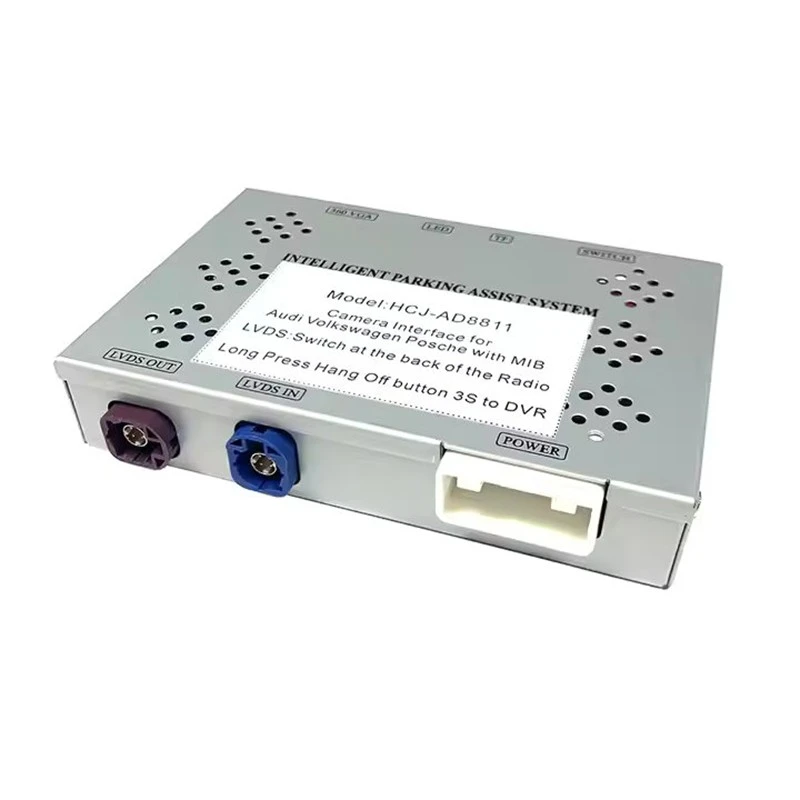
First off, let's understand what a reversing camera decoding module does. It's a key component that helps translate the signals from your reversing camera into a clear and accurate image on your car's display. This ensures that you get a proper view of what's behind your vehicle when you're backing up, which is super important for safety.
Now, before you start the calibration process, you need to make sure you have the right module for your Volkswagen. We offer two great options: the Volkswagen Co-Driver CD Reverse Camera Decoder Module (2016 - 2023 Full Compatibility) and the Volkswagen/Audi New Energy Reverse Camera Decoder Module (2021 - 2024 Full Compatibility). These modules are designed to fit specific Volkswagen models and years, so make sure you pick the one that matches your car.
Step 1: Gather Your Tools
The first thing you'll need to do is gather the necessary tools. You'll need a good set of screwdrivers, as you might have to remove some panels in your car to access the decoding module. A voltage meter is also important. This will help you check the electrical connections and make sure everything is getting the right amount of power. And don't forget a clean cloth to wipe down any surfaces and keep things tidy.
Step 2: Locate the Decoding Module
The next step is to find where the decoding module is located in your Volkswagen. In most cases, it's installed near the car's multimedia system or the reversing camera itself. You might have to refer to your car's manual or do a quick online search to find the exact location for your specific model. Once you've found it, carefully remove any panels or covers that are blocking access to the module.
Step 3: Check the Electrical Connections
Before you start calibrating, it's crucial to check the electrical connections. Make sure all the wires are properly plugged in and there are no loose connections. Use your voltage meter to check if the module is getting the correct voltage. If the voltage is too low or too high, it could affect the calibration and the performance of the module. If you find any issues with the connections, fix them before moving on.
Step 4: Initial Setup
Once you've confirmed that the electrical connections are good, it's time to start the initial setup. Turn on your car's ignition, but don't start the engine. This will power up the multimedia system and the reversing camera. You should see the camera's image on the display. If you don't, double - check the connections again.
Step 5: Enter the Calibration Mode
Now, you need to enter the calibration mode. The process for this can vary depending on the model of your Volkswagen and the decoding module you're using. In some cases, you might need to access the settings menu on your car's multimedia system. Look for an option related to the reversing camera or the decoding module. Once you find it, select the calibration option.
Step 6: Adjust the Image
Once you're in the calibration mode, you'll be able to adjust the image on the display. You can adjust the horizontal and vertical alignment of the image. This is important because it ensures that the image accurately represents what's behind your car. You might also be able to adjust the brightness and contrast of the image to make it clearer. Use the on - screen controls or the buttons on your car's multimedia system to make these adjustments.

Step 7: Set the Guidelines
Most reversing camera decoding modules come with guidelines that help you judge the distance between your car and objects behind it. You'll need to set these guidelines correctly. The module will usually have a calibration process for the guidelines. You might need to place some reference objects at a known distance behind your car and then adjust the guidelines on the display to match the actual distance. This step is crucial for accurate parking and reversing.
Step 8: Test the Calibration
After you've made all the adjustments, it's time to test the calibration. Put your car in reverse and slowly back up. Check the image on the display and make sure it accurately shows what's behind your car. Pay attention to the guidelines and see if they correctly indicate the distance to objects. If you notice any issues, go back and make further adjustments.
Step 9: Final Checks
Once you're satisfied with the calibration, do a final check of all the connections. Make sure everything is still properly plugged in and there are no loose wires. Also, check the module for any signs of overheating or other issues. If everything looks good, you can put back any panels or covers that you removed earlier.
Troubleshooting Tips
Sometimes, you might run into some problems during the calibration process. If the image on the display is blurry or distorted, it could be due to a faulty camera or a problem with the decoding module. Check the camera for any dirt or damage and clean it if necessary. If the problem persists, it might be a problem with the module itself, and you might need to contact us for further assistance.
If the guidelines on the display are not accurate, double - check the calibration process. Make sure you followed all the steps correctly and that the reference objects were placed at the correct distance. You might need to repeat the calibration process to get the guidelines right.
Why Choose Our Modules
As a supplier, we take pride in offering high - quality Volkswagen reversing camera decoding modules. Our Volkswagen Co-Driver CD Reverse Camera Decoder Module (2016 - 2023 Full Compatibility) and Volkswagen/Audi New Energy Reverse Camera Decoder Module (2021 - 2024 Full Compatibility) are designed to provide accurate and reliable performance. They are easy to install and calibrate, and they come with excellent customer support.
If you're in the market for a Volkswagen reversing camera decoding module or if you have any questions about the calibration process, don't hesitate to reach out. We're here to help you make the right choice and ensure that your reversing camera system works perfectly. Whether you're a DIY enthusiast or a professional mechanic, we've got the products and the knowledge to support you.
So, if you're interested in purchasing our Volkswagen reversing camera decoding modules or want to discuss your specific needs, feel free to get in touch. We're looking forward to working with you and helping you enhance the safety and functionality of your Volkswagen.
References
- Volkswagen Owner's Manuals
- Technical documentation for reversing camera decoding modules


