


Calibrating a BMW handle camera is a crucial process that ensures optimal performance and accurate imaging, which is essential for safe driving and a seamless user experience. As a supplier of BMW handle cameras, I understand the significance of this calibration process and am here to guide you through it step by step.
Understanding the Importance of Calibration
Before delving into the calibration process, it's important to understand why calibration is necessary. A properly calibrated BMW handle camera provides clear and accurate images, which are vital for functions such as parking assistance and rear - view monitoring. Over time, factors like vibrations, temperature changes, and physical impacts can cause the camera to lose its calibration, resulting in distorted or inaccurate images. By regularly calibrating the camera, you can maintain its performance and reliability.
Pre - calibration Preparations
- Gather the Necessary Tools: You will need a clean microfiber cloth, a level, and a calibration target. The calibration target can be a specific pattern designed for BMW handle cameras, which can often be obtained from the camera manufacturer or supplier.
- Choose the Right Location: Select a flat, well - lit area. A garage or an empty parking lot is ideal. Make sure there are no obstructions in the camera's field of view and that the surface is level.
- Inspect the Camera: Check the camera for any visible damage, such as cracks or loose connections. Clean the lens with the microfiber cloth to remove any dirt, dust, or debris that could affect the calibration process.
Calibration Process for Different BMW Models
BMW Handle Camera (2008 - 2014 Models)
The BMW Handle Camera (2008 - 2014 Models) has its own unique calibration requirements.
- Mount the Calibration Target: Place the calibration target at a specific distance from the rear of the vehicle, as recommended by the camera's manual. Usually, it should be centered and at a height that aligns with the camera's line of sight.
- Access the Calibration Menu: Start the vehicle and turn on the camera system. Navigate to the camera settings menu on the infotainment system. Look for the calibration option.
- Adjust the Camera Angle: Use the level to ensure that the camera is mounted horizontally. If necessary, make small adjustments to the camera's mounting brackets to achieve a perfectly level position.
- Fine - tune the Calibration: Follow the on - screen instructions in the calibration menu. The system will prompt you to adjust the camera's settings, such as the vertical and horizontal alignment, until the image on the screen matches the calibration target accurately.
BMW Handle Camera (2011 - 2017 Models)
The BMW Handle Camera (2011 - 2017 Models) may have some differences in the calibration process.
- Initial Setup: Similar to the previous models, mount the calibration target at the appropriate distance and height. Ensure that the target is well - illuminated.
- Enter the Diagnostic Mode: In some cases, you may need to enter the vehicle's diagnostic mode to access the advanced calibration options. This can usually be done by following a specific sequence of button presses on the infotainment system or using a diagnostic tool.
- Calibration Adjustments: Once in the calibration menu, make adjustments to the camera's parameters. This may include adjusting the focus, contrast, and color settings in addition to the alignment. Use the on - screen guides and prompts to make precise adjustments.
BMW Handle Camera (2018 - 2023 Models)
The BMW Handle Camera (2018 - 2023 Models) often comes with more advanced calibration features.
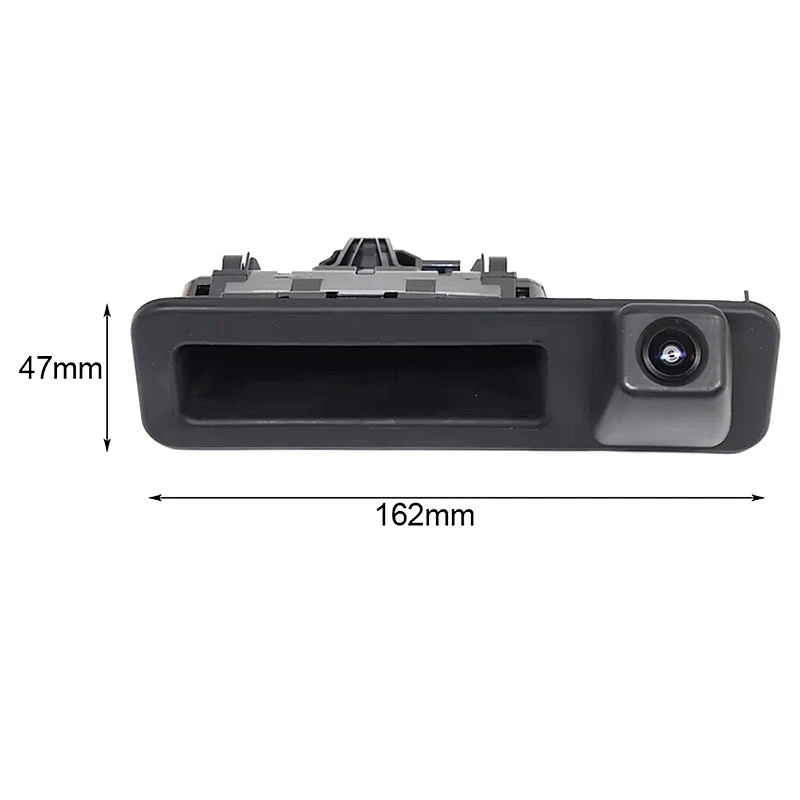

- Automatic Calibration Option: Some of these models may have an automatic calibration feature. Start the vehicle and activate the camera system. If the automatic calibration option is available, select it. The camera will then analyze the calibration target and make the necessary adjustments on its own.
- Manual Verification and Fine - tuning: Even if the automatic calibration is successful, it's still a good idea to manually verify the calibration. Check the image on the screen for any signs of misalignment or distortion. If needed, use the manual calibration options in the menu to make minor adjustments.
Post - calibration Checks
- Test the Camera: Drive the vehicle slowly in a safe area and test the camera's functionality. Check the rear - view image on the infotainment system while turning the steering wheel and changing the gear. Ensure that the image remains clear and accurate throughout these maneuvers.
- Check for Warning Messages: Look for any warning messages on the dashboard or infotainment system related to the camera. If there are any error messages, it may indicate that the calibration was not successful, and you may need to repeat the process.
Common Calibration Issues and Solutions
- Inaccurate Alignment: If the camera image appears tilted or misaligned, double - check the camera's mounting and the levelness of the calibration target. Make sure that the camera is mounted securely and that the target is placed correctly.
- Blurry or Distorted Images: This could be due to a dirty lens or incorrect focus settings. Clean the lens again and use the calibration menu to adjust the focus.
- Calibration Failure: If the calibration process fails, ensure that you are following the correct procedure for your specific BMW model. Check the camera's software for any updates, as outdated software can sometimes cause calibration issues.
Why Choose Our BMW Handle Cameras
As a supplier of BMW handle cameras, we offer high - quality products that are designed to meet the strict standards of BMW vehicles. Our cameras are made from durable materials and are equipped with the latest technology to ensure clear and accurate imaging. We also provide comprehensive support for calibration and maintenance, including detailed manuals and technical assistance.
If you are interested in purchasing our BMW handle cameras or need further information about calibration, we encourage you to contact us for a procurement discussion. Our team of experts is ready to assist you in finding the right camera for your BMW model and ensuring that it is properly calibrated for optimal performance.
References
- BMW Owner's Manuals for respective models
- Camera Manufacturer's Calibration Guides


