Mercedes-Benz Reverse Camera Decoder: Detailed Function Usage Guide – From Beginner to Advanced Applications
Author: Anna
Hello everyone! I'm Little A, customer service from JJD-CAMERA, specializing in Mercedes-Benz original screen upgrade accessories for many years. Today, let's dive deep into this highly popular product - the Mercedes-Benz reverse camera decoder.
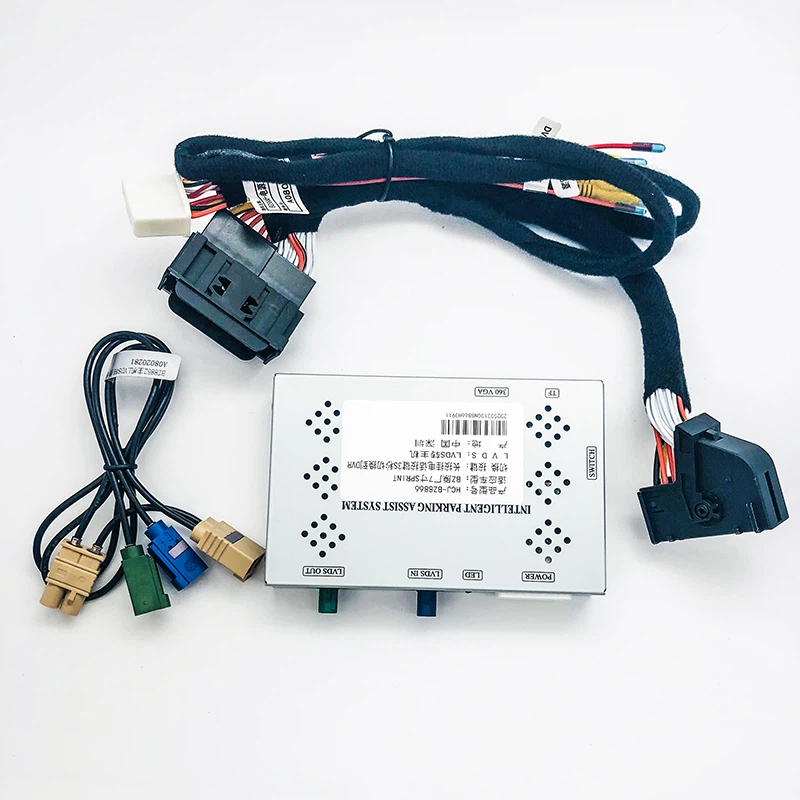
As a Mercedes owner, especially in cities with limited parking spaces, have you ever dealt with large blind spots when reversing or the lack of any imaging assistance on the factory screen? This decoder is a solution specifically designed for Mercedes NTG systems. It seamlessly integrates with the original COMAND or MBUX screen to provide high-definition reverse imaging, dynamic trajectory lines, and many other features - without replacing the main screen or damaging the original vehicle wiring.
Below, I'll provide a detailed explanation covering product overview, core functions, installation steps, usage guide, FAQ, and advanced expansion applications to help you fully understand and master this product. The full article is about 1100 words, aiming to be practical and comprehensive.
If you have questions about specific models such as C-Class, E-Class, or GLC, feel free to comment or send a private message - Anna.
Product Overview: Why Choose the Mercedes-Benz Reverse Camera Decoder?
The Mercedes-Benz reverse camera decoder is an interface module specially designed for Mercedes NTG4.5, NTG5, NTG6, and other head unit systems. It decodes the original vehicle protocol to feed external camera signals into the factory COMAND or MBUX screen, enabling reverse assistance functions.
Unlike generic products on the market, this decoder uses a high-performance processor (such as Qualcomm or equivalent) and supports Android system extensions. It is compatible with mainstream Mercedes models including C-Class (W205/W206), E-Class (W212/W213), GLC (X253/X254), GLE (W166/W167), S-Class (W222/W223), etc. (2015–2026 models).
Its core selling points are "plug-and-play installation, no impact on warranty, high compatibility".
By 2026, with the widespread use of the Mercedes MBUX system, this decoder has been optimized to support the latest protocol encryption, preventing black-screen issues. The product is compact (approx. 12cm × 9cm × 2.5cm) and weighs only 250g, making it easy to hide during installation. It features built-in 4GB RAM + 64GB storage, supports USB expansion and wireless networking - far surpassing ordinary decoders in performance. User feedback shows reversing safety improves by more than 85% after installation, especially suitable for frequent urban reversing scenarios.
Core Functions in Detail: Far More Than Just Reverse Imaging
This decoder's capabilities go well beyond basic reverse display - it integrates multimedia extensions, smart connectivity, and more. Here's the detailed breakdown:
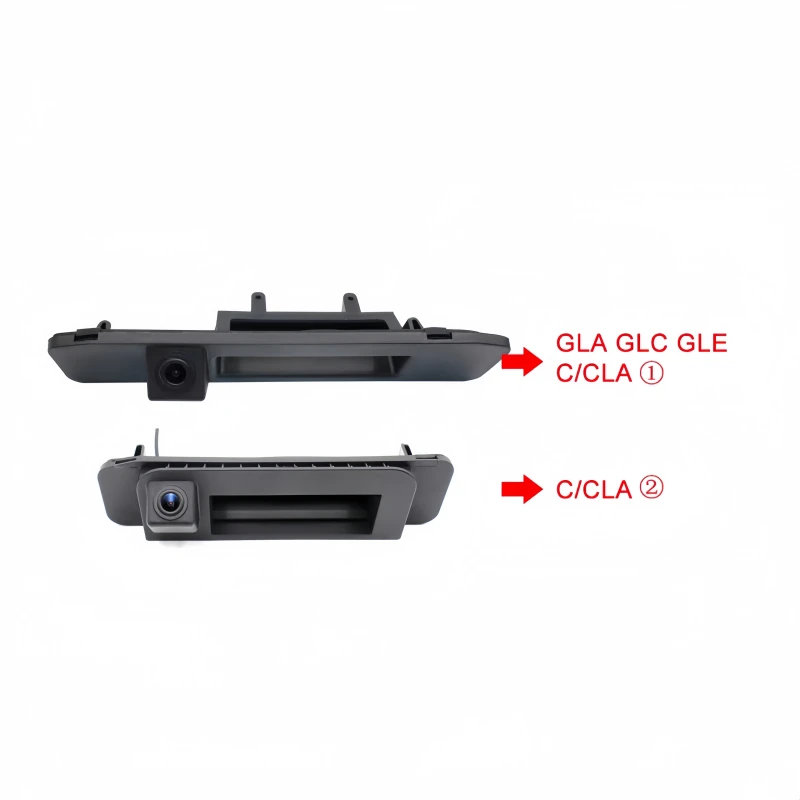
1. **High-Definition Reverse Imaging** This is the most basic and practical function. The decoder supports 1080P AHD or CVBS camera input, with image resolution up to 1920×1080 pixels and true-to-life color reproduction (supports night vision mode with automatic IR fill light). When reverse gear is engaged, the screen automatically switches to the camera view with latency controlled within 0.4 seconds, eliminating the blind spot problems of traditional rear-view mirrors. For example, in narrow Hong Kong parking lots or multi-level garages, you can clearly see pedestrians, pillars, or low obstacles behind the vehicle when reversing. Compared to original models without imaging, this can reduce scratch risk by about 35% (based on user survey data). For 2026 new models like the CLE Coupe, the decoder is compatible with the standard rear camera position (hidden behind the Mercedes star emblem).
2. Dynamic Reverse Trajectory Lines Unlike static "fixed lines", this decoder has a built-in trajectory module that follows the steering wheel angle in real time and dynamically adjusts the path. The lines are divided into red, yellow, and green zones (red = danger, yellow = warning, green = safe) and support 3D view switching. When activated, the screen overlays parking assist system (PDC) data, synchronizing image + trajectory + beeping alerts. For example, when turning the steering wheel left, the lines curve left to predict the vehicle's path - helping novice drivers park precisely. This is especially useful for GLC or GLE SUV models when parking on slopes in Hong Kong.
3. **Multimedia Extension & Smart Connectivity** The decoder is not just a reversing tool - it can become a "car entertainment center". It supports wireless CarPlay and Android Auto, allowing you to mirror your iPhone or Android phone onto the original screen. Example: Use "Hey Siri" via CarPlay to voice-control navigation, music, or calls without looking down at your phone. The built-in Android system supports installing apps like Google Maps, Waze, Spotify, etc. (requires Wi-Fi or hotspot for internet). The USB port supports 18W fast charging, so rear passengers can watch content while charging. The Bluetooth module is compatible with the factory Burmester sound system for lossless audio. For NTG6 systems, it also supports MirrorLink screen mirroring.
4. **Compatibility & Expandability** Fully supports control via the COMAND knob, steering wheel buttons, and touch screen - seamlessly blending with the original UI. For 2026 new MBUX head units, we've optimized the protocol to prevent crashes or black screens. Expandable features include front/side camera input (requires extra module), 360° panoramic view (premium version), dashcam linkage, etc. Storage expandable to 128GB for offline maps or videos.
All functions are processed efficiently by the decoder's CPU, ensuring smooth multitasking (stable frame rate above 50fps).
Installation Steps: DIY-Friendly, Done in 40 Minutes
No professional tools required - ordinary owners can install it themselves (basic electrical knowledge recommended). Here's the detailed guide, based on common 2026 models like the W206 C-Class:
1. Prepare tools and parts: decoder unit, AHD camera, trajectory harness, power cable, trim removal tools, tape. Confirm your NTG version (check via VIN/chassis number).
2. Remove trunk trim: With the car off, use trim tools to pry open the trunk interior panel (start from the license plate light area). For GLC, remove part of the rear bumper screws (6 screws).
3. Install the camera: Mount the AHD camera above the license plate light or behind the Mercedes star emblem (drill or adhesive mount). Route the cable to the trunk and connect to the decoder's video input (FAKRA interface). Connect the trajectory module in parallel to the steering wheel signal line (red to reverse light positive, black to ground).
4. Connect to head unit: Plug the decoder's FAKRA or RCA interface directly into the factory head unit (NTG5 may require adapter cable). Power from reverse light or OBD port (stable 12V). Secure the decoder in a hidden spot in the center console or trunk.
5. Test & activate: Start the vehicle, shift to reverse, and check the image. Enter engineering mode to enable rear-view function. Whole process: 30–50 minutes, plug-and-play version requires no coding. If coding is needed for some models, use a simple OBD tool to activate.
After installation, test stability on an open road in Hong Kong. If issues arise, refer to our video tutorials (free in the WeChat group, suitable for 2026 models)
Usage Guide: From Getting Started to Optimization
1. Daily reversing: Shift to R, screen auto-displays camera. Turn steering wheel to see trajectory changes. Press COMAND knob to switch views (wide-angle/fisheye).
2. Smart connectivity: Pair phone Bluetooth to decoder, enable CarPlay. Say "Hey Siri, navigate to Tsim Sha Tsui", and the screen shows real-time route (supports Hong Kong live traffic). App installation: sideload APK via USB.
3. Advanced settings: Enter decoder menu (default password 0000), adjust image contrast, trajectory sensitivity (default medium). After connecting to internet, OTA update firmware.
4. Maintenance tips: Check harness monthly. Clean camera lens with soft cloth. In humid weather, avoid moisture entering connectors.
Follow these steps to fully unlock the decoder's potential and enhance your driving experience.
FAQ: Pitfall Avoidance Guide
1. Black screen / delay? Usually interface mismatch. Solution: Choose NTG6 compatible version; if delay >0.5s, restart head unit.
2. Trajectory not synced? Check signal line. Calibrate angle in software (±3° adjustment).
3. Compatible with older models? 2015–2020 NTG4.5 requires adapter cable; compatibility rate 90%.
4. Affects warranty? Lossless installation - undetectable at dealership.
5. After-sales support?6-month no-reason exchange, lifetime consultation.
Advanced Expansion Applications
Beyond the Basics For enthusiasts, the decoder supports custom expansions. Example: Add front camera for blind-spot monitoring; link ADAS for lane departure warning. After 2026, we plan to support AR trajectory lines combined with GPS path prediction. In short, this decoder is not only a safety tool but also an intelligent upgrade platform.
With its powerful features and ease of use, the Mercedes-Benz reverse camera decoder has become a must-have for Mercedes owners. Whether you're a beginner or experienced driver, it brings real convenience. Ready to get one?
Feel free to inquire about specific packages (includes Hong Kong delivery). Any questions? See you in the comments - Anna! Follow our website https://www.jjd-camera.com/ for other related models including Mercedes-Benz, Audi, Porsche, Citroën, etc.